Blizzard has suggested a PTR-account check
At 20:06 UTC on 18 September, Kaivax replied to the missing account-selector report with a suggested test: create a PTR account through Battle.net account management, then check whether a choice appears at login. The wording is exploratory. It is not a confirmed fix for everyone or an announcement that the bug has been resolved.
The thread concerns multiple WoW licences under one Battle.net account and reports of a second login disconnecting the first player. This is more specific than a general beta queue or a graphics crash. If your symptom is different, do not assume the same check applies.
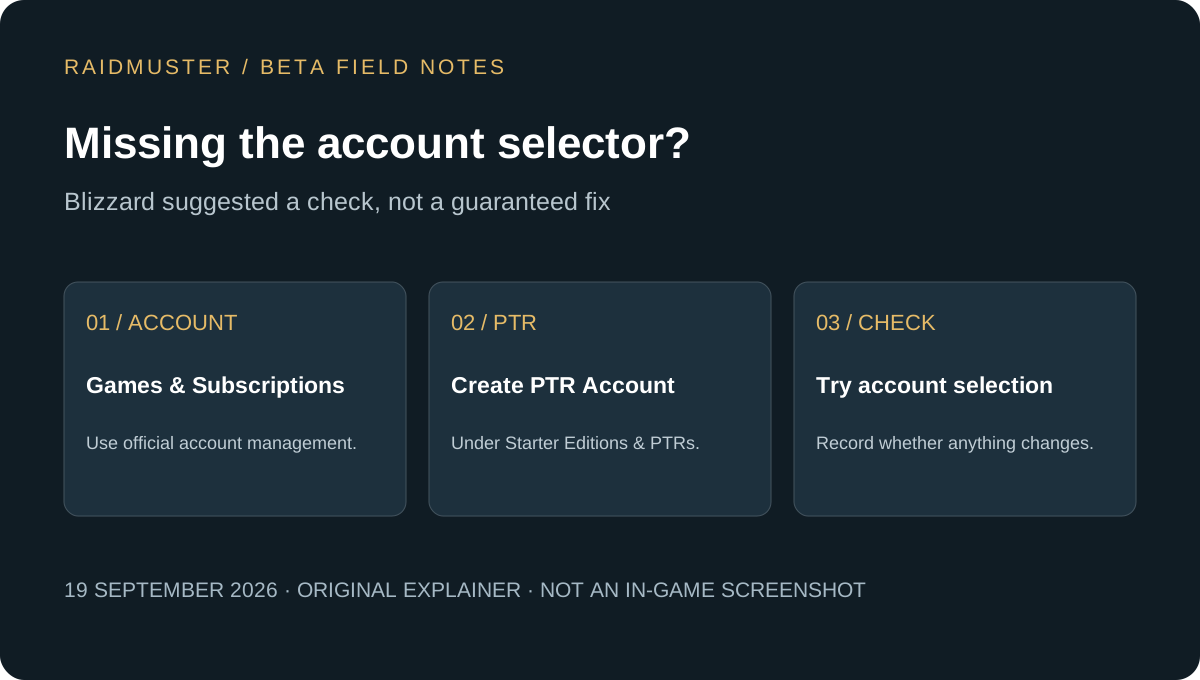
How to try the suggested check
Use the official Battle.net account page and follow the route in Kaivax’s reply: Games & Subscriptions, then Starter Editions & Public Test Regions. Choose Create PTR Account and confirm Create Account if that option is available. Afterward, check whether logging in offers an account choice.
A participant reported a working account choice at 20:26 UTC. Later replies at 20:41 and 20:50 UTC, and at 03:41 UTC on 19 September, also reported success after the suggestion. These are encouraging player reports, not proof that this procedure fixes all affected configurations. If the option is absent or the result is unchanged, record that outcome in your support request rather than repeatedly creating accounts.
The reply does not say this grants a beta invitation or bypasses access requirements. It also does not establish how characters or entitlements behave when switching. Verify which character list you see before assuming you have reached the intended account.
A guild onboarding check before your next session
For a guild leader, the goal is to find out who can join the planned activity without turning the roster into an account-support database. Ask members to complete the login check themselves. You need their intended character and availability, not their Battle.net password or payment details.
Use three separate questions: can you launch the client, can you reach the intended character, and can you join at the agreed time? A member who answers yes to only the first has not yet confirmed group readiness. Keep their place provisional and name a follow-up time.
If a member switches to a different test character, confirm its name and planned role before updating your WoW guild roster. Avoid counting two characters belonging to one person as two independently available players.
| Record | Why it helps |
|---|---|
| Player’s preferred display name | Keep one person identifiable across character changes. |
| Intended beta character and role | Know which character is joining the group. |
| Ready, checking access, or unavailable | Separate technical access from attendance. |
| Next check-in time | Give the organiser a clear follow-up. |
What to include if the selector is still missing
Write down the client build, whether an account choice appeared, and the exact stage at which the unexpected disconnect occurred. Note whether the suggested PTR-account check changed anything. Send private account identifiers only through the relevant official support channel, rather than publishing them in a guild note.
A useful report describes the observed sequence: the first player entered the world; the second attempted to log in; the first disconnected. Keep the error text if one appeared. This is stronger evidence than assuming every disconnect came from the same cause.
If the client instead freezes or closes, consult our beta crash guide. If several unrelated members are waiting or disconnecting together, read the server disruption and guild-session guide. Neither article is a live incident-status service.
Keep recruitment moving while access is checked
An access problem does not prevent someone stating their class interests, usual play times or profession plans. Collect those intentions in your guild roster template, then confirm the actual beta character once the member can enter.
For a new guild, this keeps recruitment and session attendance distinct. A prospective member can remain interested without being counted toward tonight’s group. Once access works, revisit their role and availability instead of relying on the first unsuccessful login attempt.